

LessAccounting, AI workflow for B2B accounting firms with Gmail classification, draft replies, and per-client scoring
An AI-driven accounting workflow that classifies every client email, drafts replies in the operator's tone, and turns inbox traffic into a per-client health score.
Project Overview
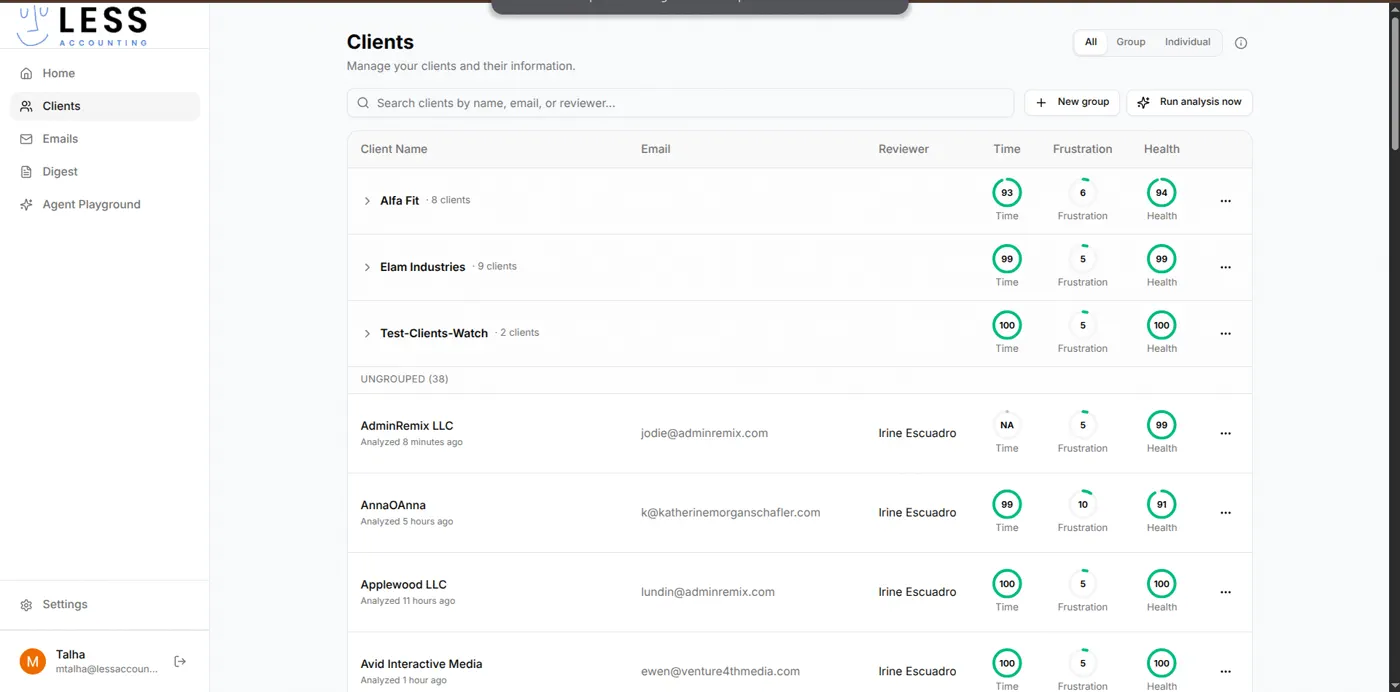
LessAccounting is a B2B accounting automation platform for accounting firms managing many client engagements. It connects to Gmail and a read-only financial data source (Double HQ), uses AI to classify and respond to client emails, and surfaces a per-client health score so the firm can see who needs attention before something goes wrong. The marketing site puts it plainly: "Accounting automation that actually works." The product reflects that: the AI does the boring parts so the human can do the hard parts.
The Problem
Accounting firms drown in client email. A medium-sized practice gets dozens of inbound messages per client per week: bank statement requests, invoice clarifications, deadline panics, casual check-ins. Every message needs a triage decision. Every message needs a reply, often drafted from the same handful of patterns. Every message contributes to a fuzzy sense of how a client is doing, and nobody captures that signal.
The cost is two-sided. The accountant's day is fragmented across hundreds of small decisions, with no time to actually do accounting work. The partner has no early-warning system. A client about to churn looks identical to a client thriving until a payment is missed.
The firm wanted a single tool that labels the email, drafts the reply, and turns the signals into a per-client health score.
Challenges
- Multi-tenant by team and by client. The firm has many client companies; each client has its own threads, scoring rules, and digest recipients.
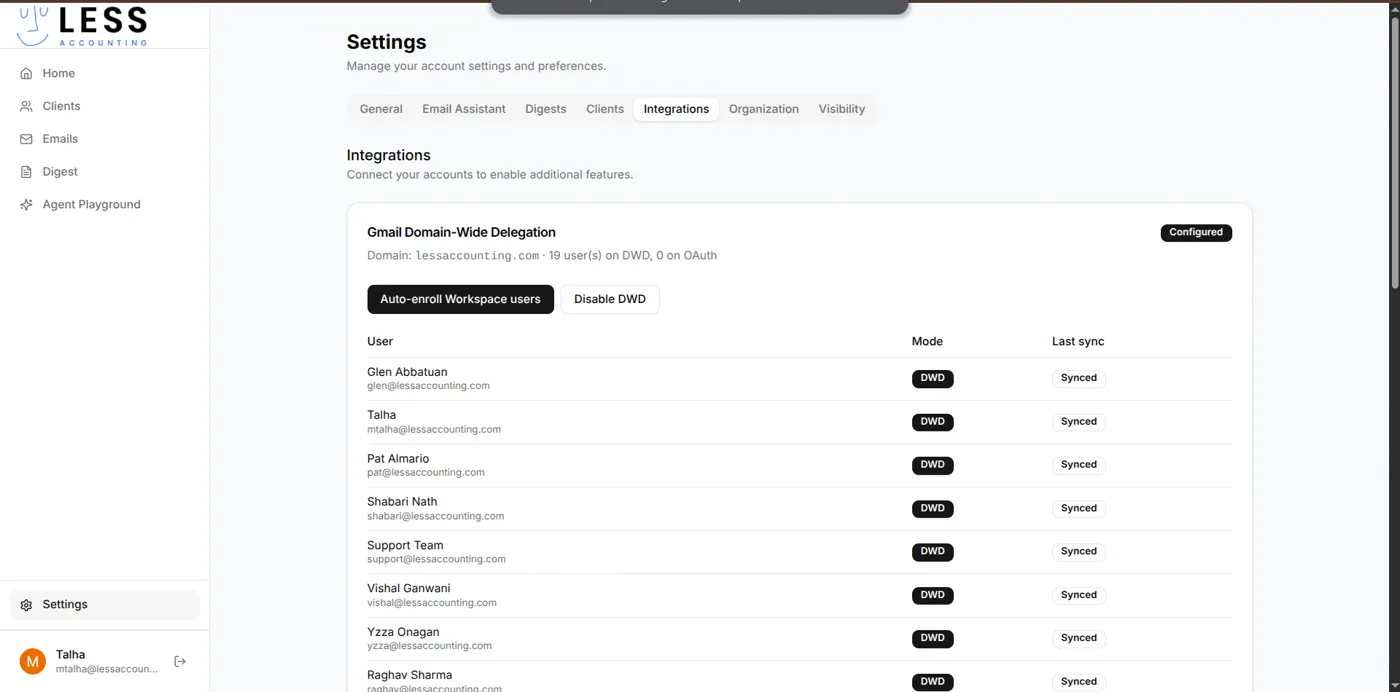
- Gmail at organisation scale. Email lives in 19 Workspace users' mailboxes. Per-user OAuth re-prompts are unacceptable in a daily-use workflow tool.
- Real client data is sensitive. Connecting to a financial source requires a read-only path, encryption at rest, and a posture that survives security review.
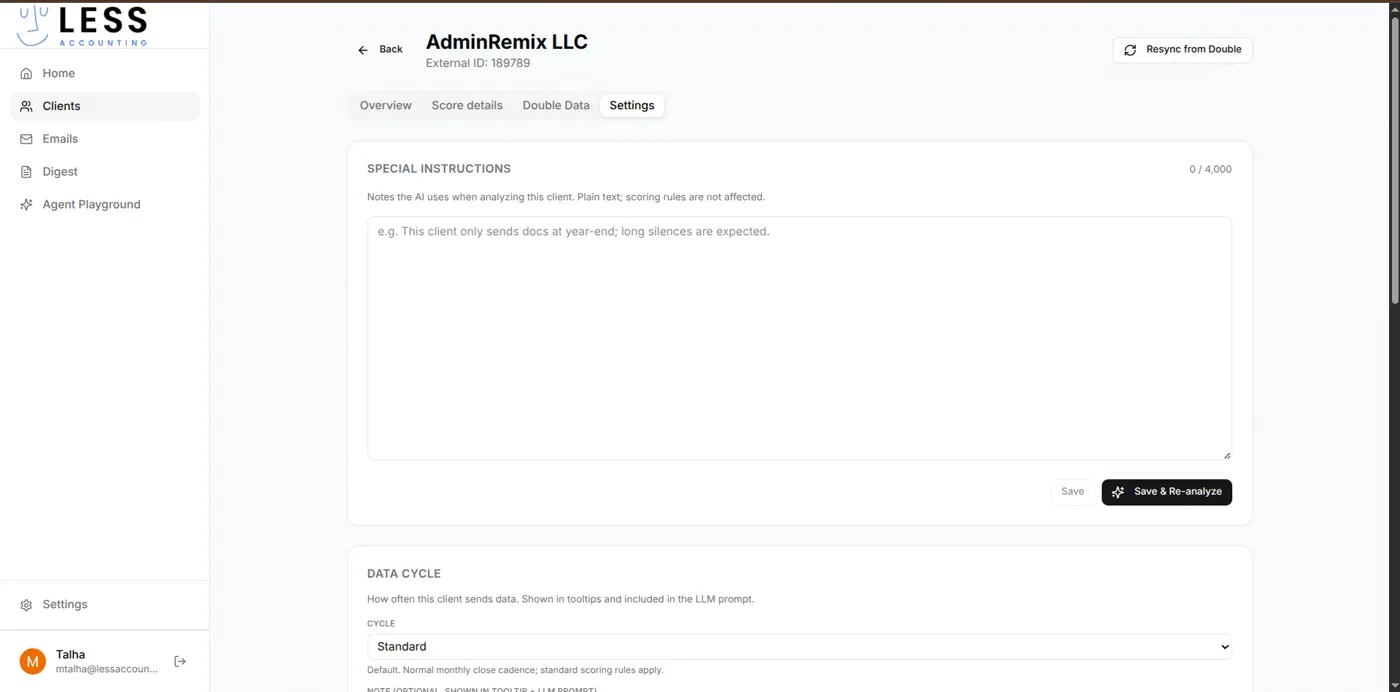
- AI quality has to be tunable per client. A client who sends documents only at year-end should not be flagged as silent. The operator needs to feed the model context.
- Performance has to be predictable. Email volume is bursty; long-running AI calls and Gmail syncs can stall the UI if they are not properly queued.
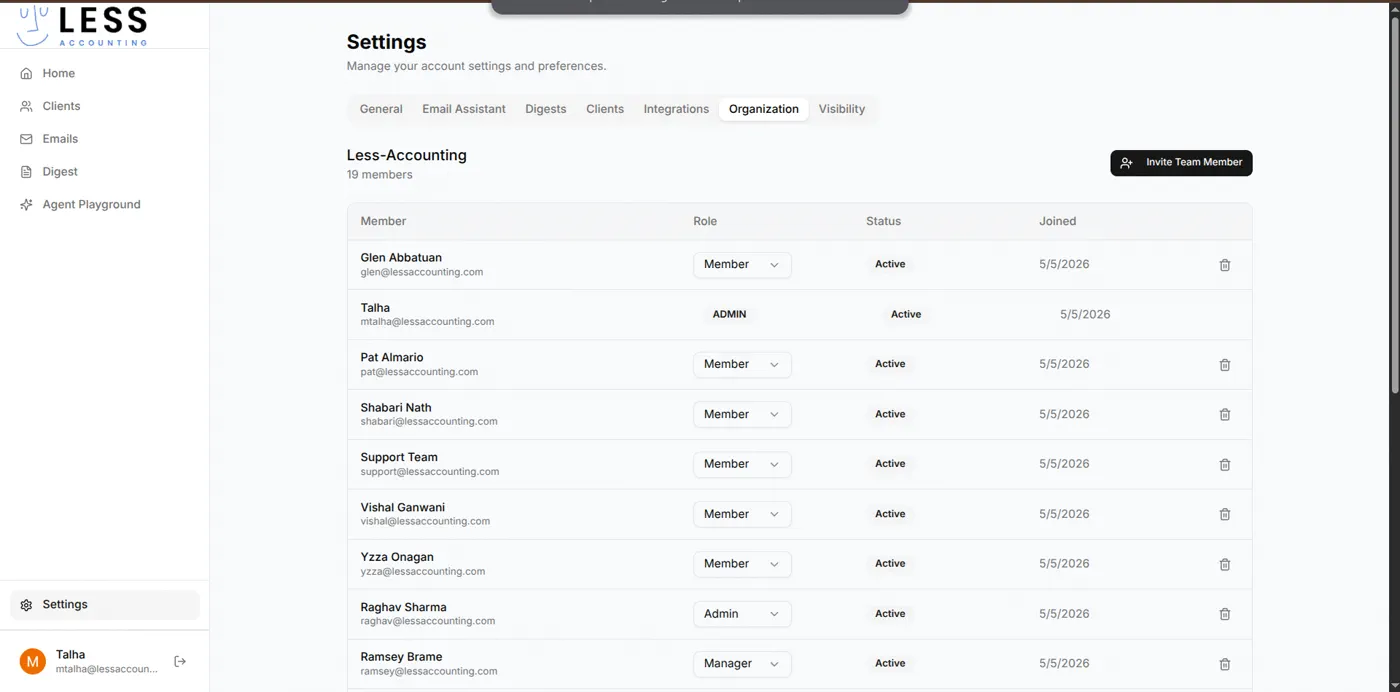
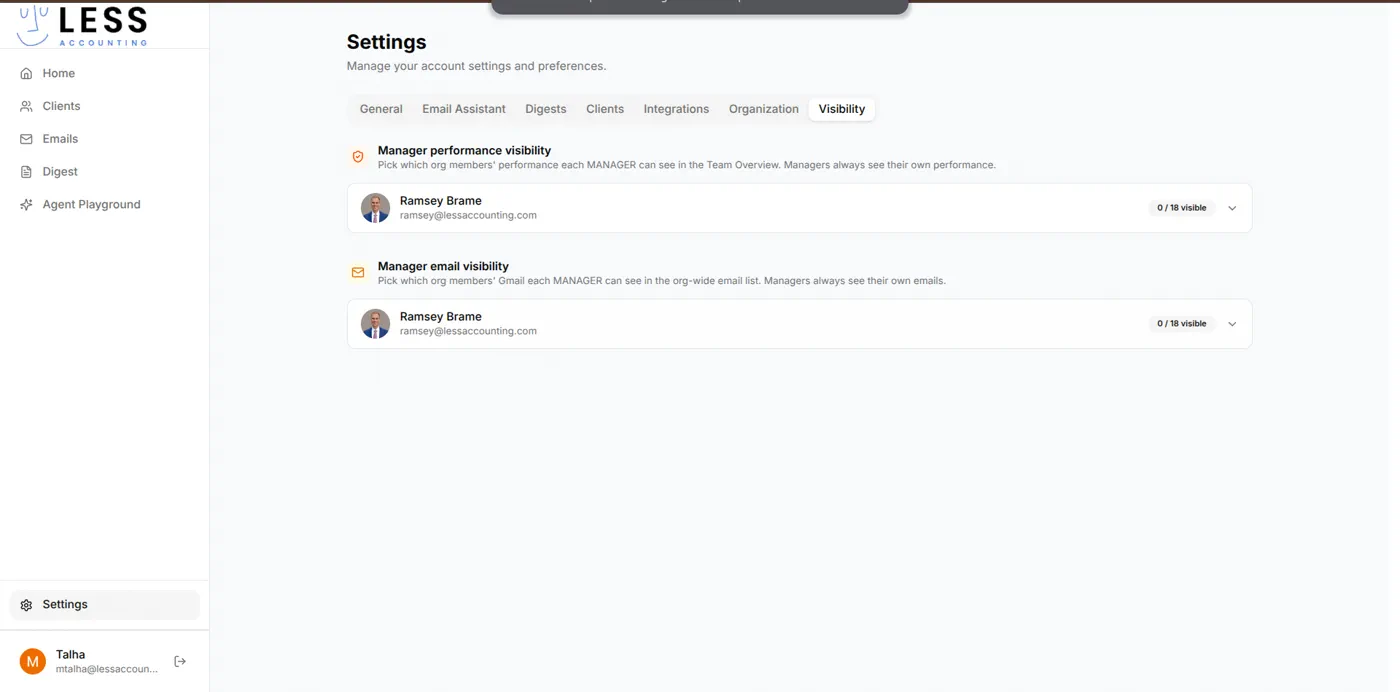
- Manager-level visibility controls. Managers see their team's performance and emails, but only the org members they are authorised to see.
- Multiple developers needed to ship in parallel against the same schema without stepping on each other.
Our Approach
We separated concerns from the start: a typed monorepo with a NestJS API for stateful work, a Next.js App Router frontend for the operator UI, Prisma as the schema source of truth, and Redis with BullMQ for any work that cannot block a request.
For Gmail we did not use per-user OAuth. We deployed Gmail Domain-Wide Delegation against the firm's Workspace domain, so the firm's admin enrols users centrally and the platform reads their inboxes via a service account. New hires are auto-enrolled; departures are revoked centrally.
For AI we put per-client special instructions in front of the model as plain text, which the operator edits at the client level. The scoring engine is rule-based with AI helpers, so the operator can read why a score moved without inspecting an opaque model output.
For team visibility we treated it as a separate first-class concept: roles decide what someone can do; per-role visibility lists decide which other org members' performance and emails they can see. The two are independent.
What We Built
User Experience
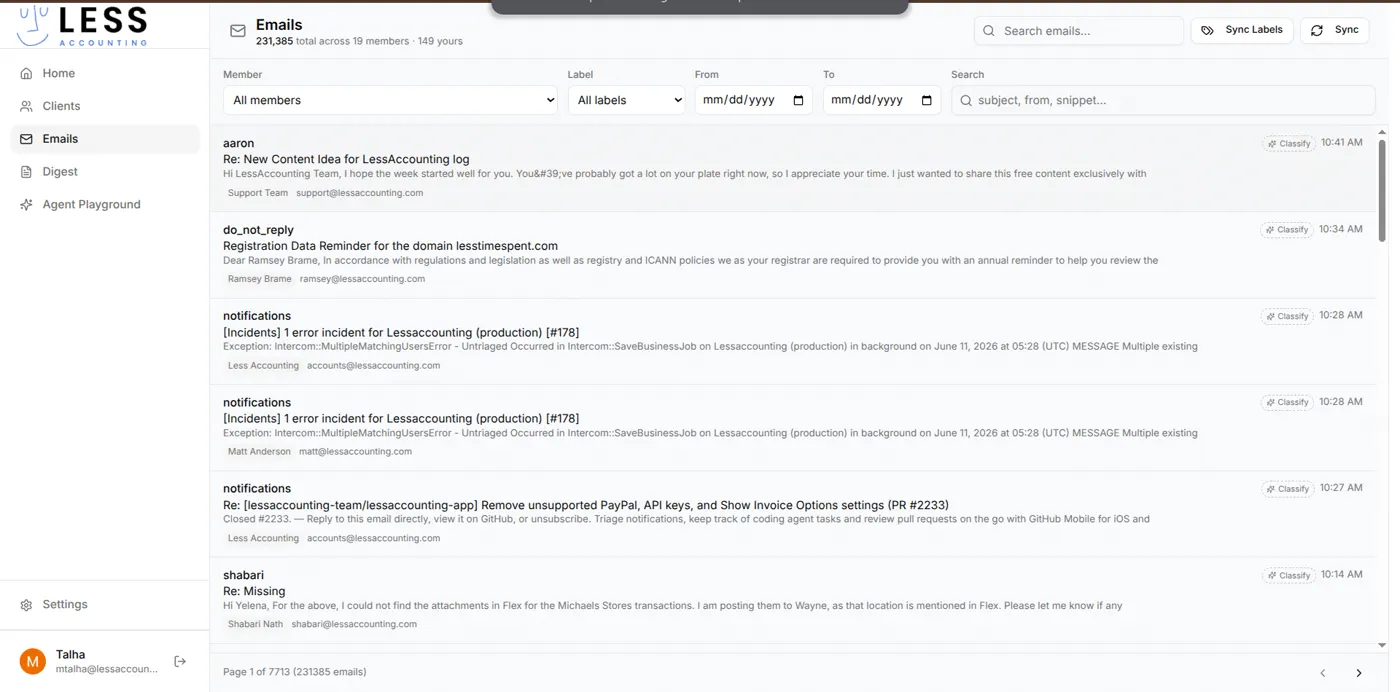
A focused dashboard centred on the operator's daily loop. The sidebar carries five primary surfaces: Home, Clients, Emails, Digest, and Agent Playground. The Clients view groups clients into firm clusters and an ungrouped list, each with three colour-coded scores: Time, Frustration, and Health. The Emails view is the org-wide inbox with the AI labels applied (To Respond, FYI, Comments, Notification, Meeting Update, Awaiting Reply, Actioned, Marketing, Spam).
AI Automation
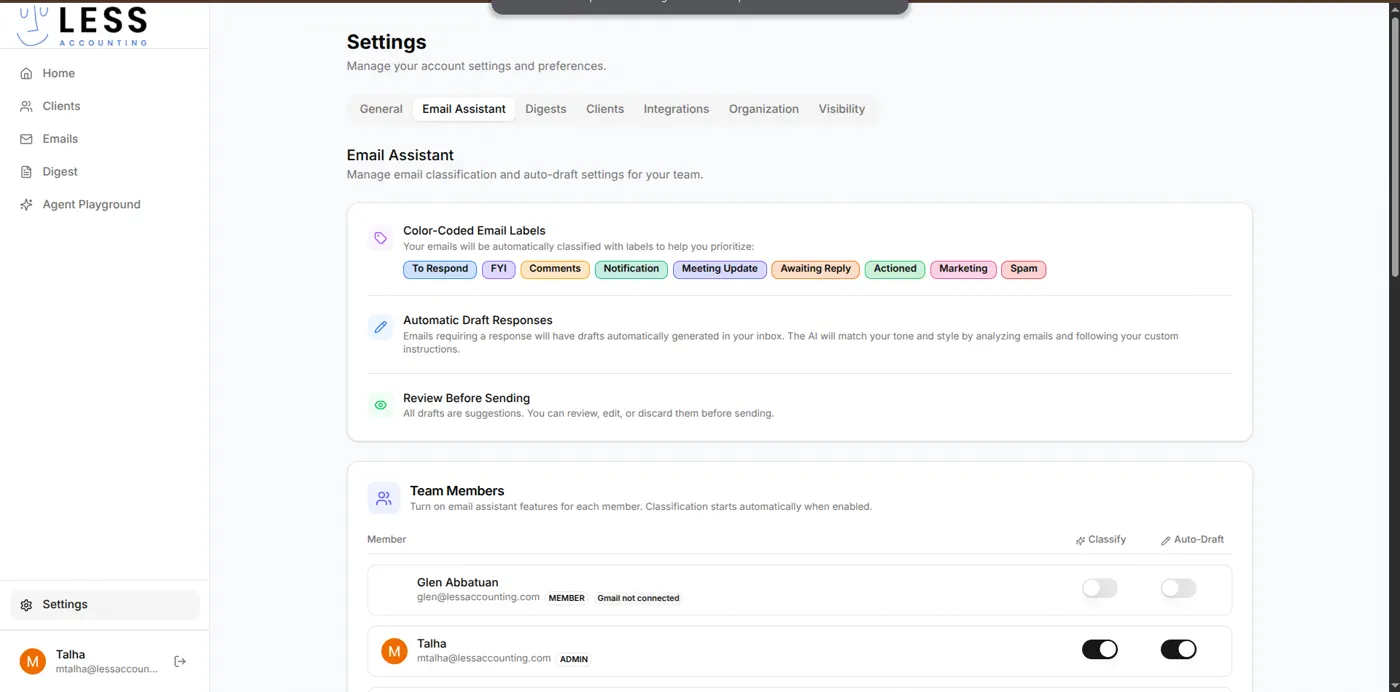
- Color-coded email labels auto-classify every inbound message into one of nine categories the operator prioritised around.
- Automatic draft responses are generated in the operator's tone, picked up from their own past sent messages.
- Per-client special instructions are plain-text notes the AI uses as context when analysing that client, so quirks like "this client only sends docs at year-end" do not show up as negative signals.
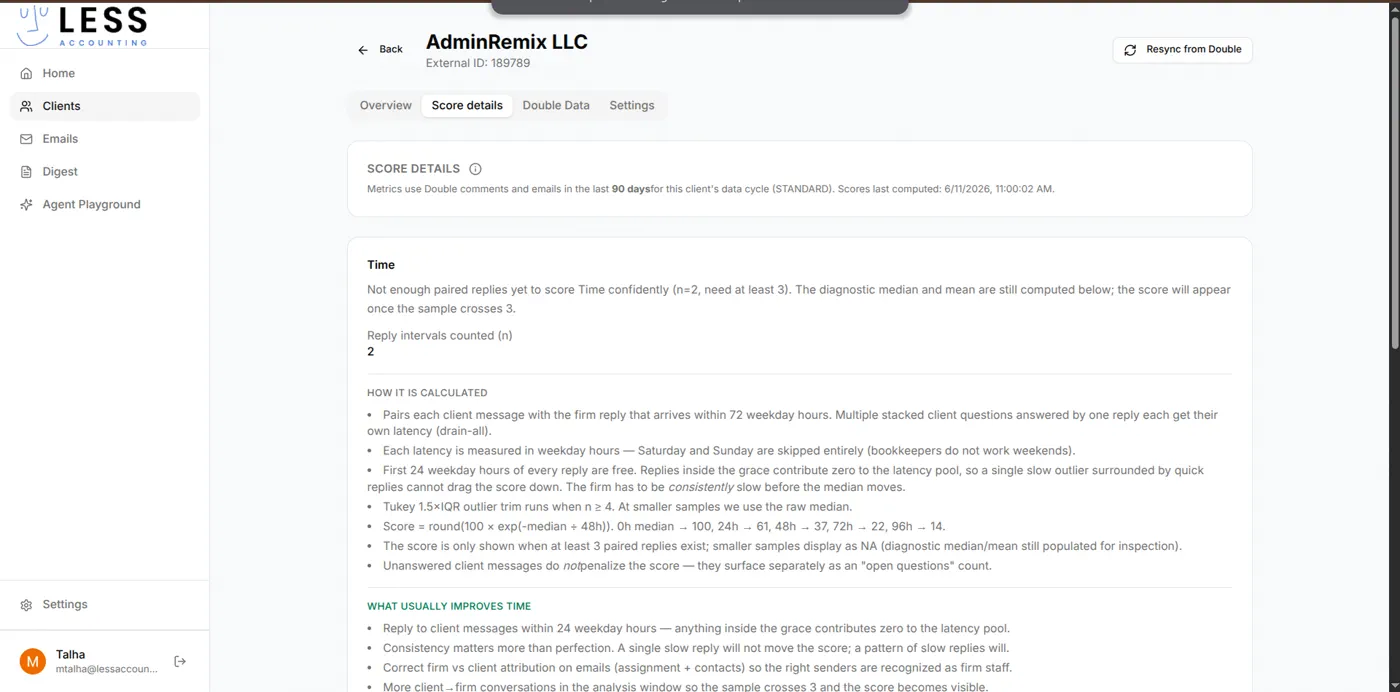
- Score details are explained in plain language at the client level. The operator can see how the Time score is computed (median reply latency in business hours, percentile bands, pairing rules) before trusting it.
Admin Operations
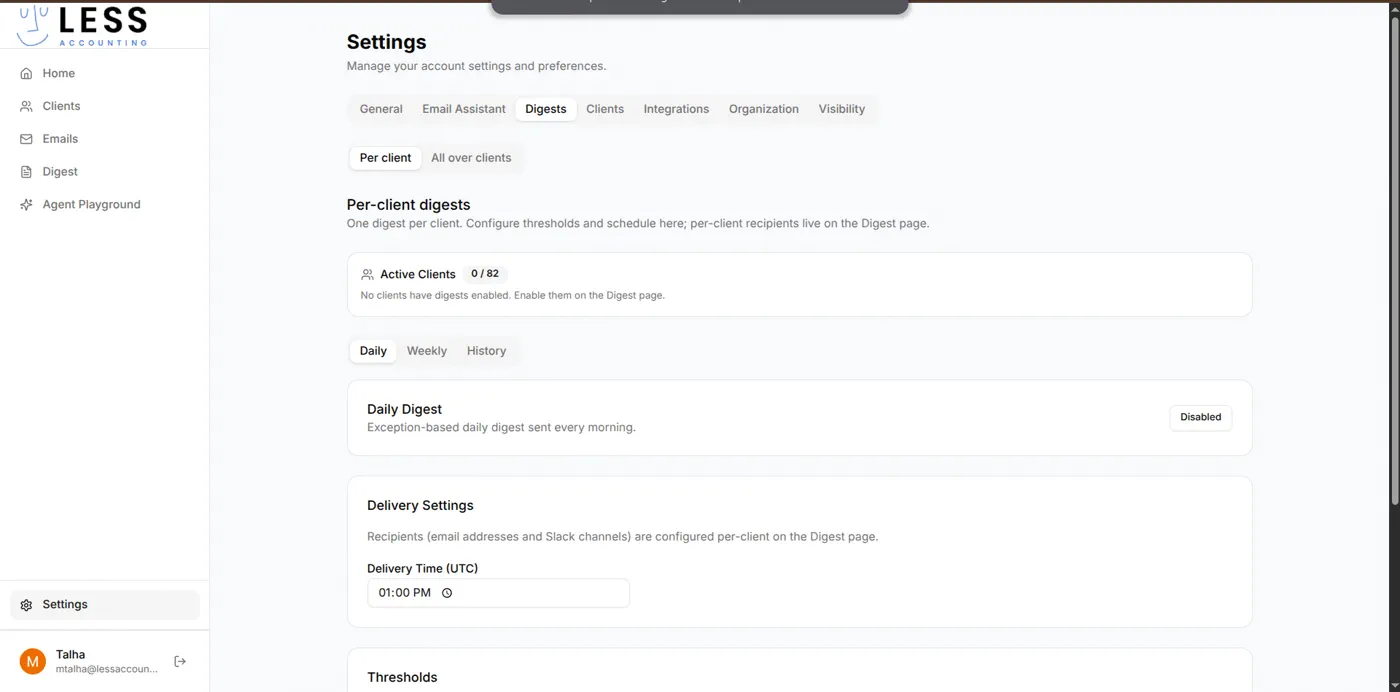
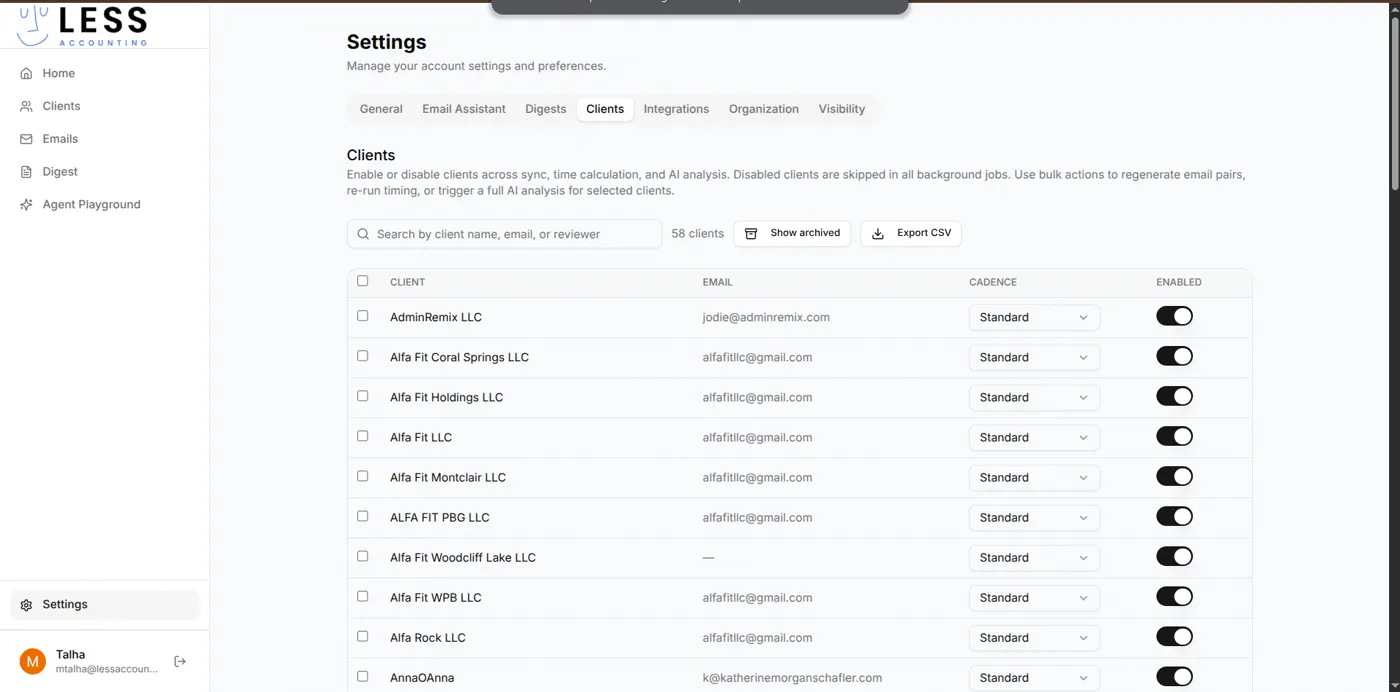
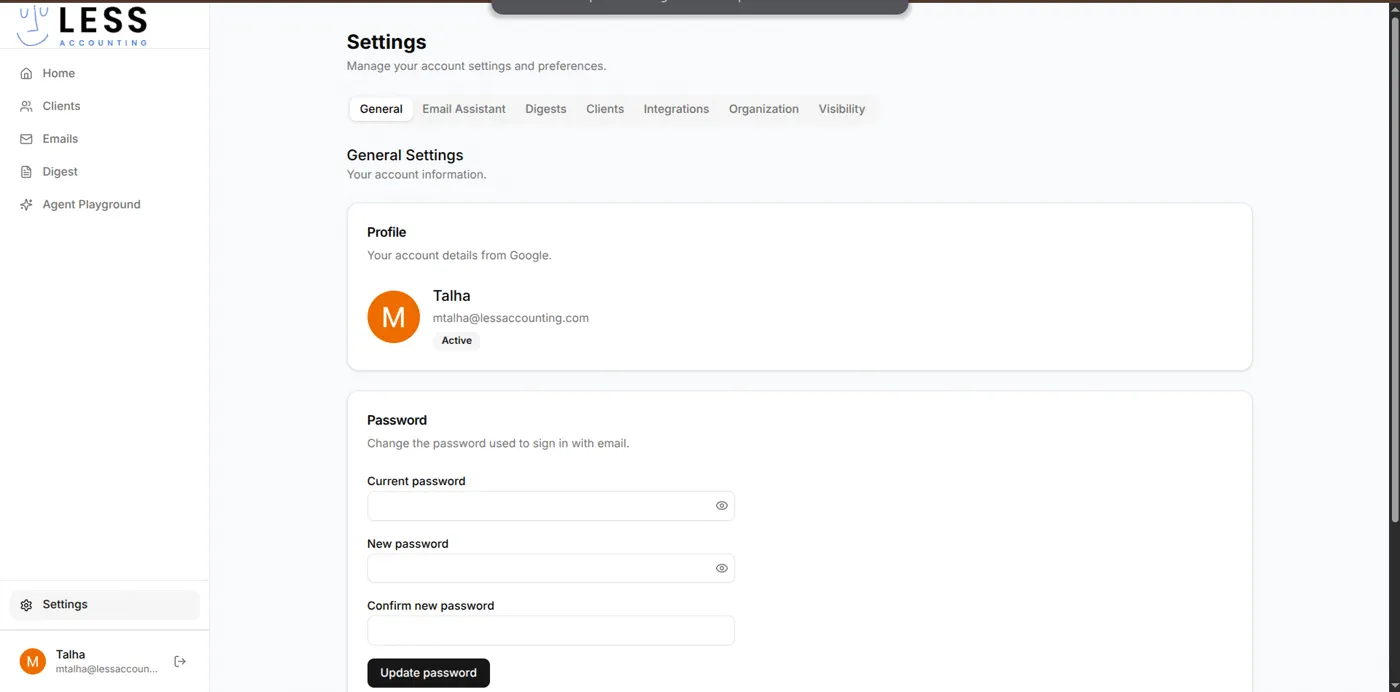
A multi-tab Settings surface covers everything the firm operator configures once and forgets: General profile, Email Assistant defaults, Digest schedules, per-client enable and cadence, Integrations, Organization members and roles, and Visibility rules. Bulk actions (enable, disable, re-analyse) are available from the client table.
Reporting
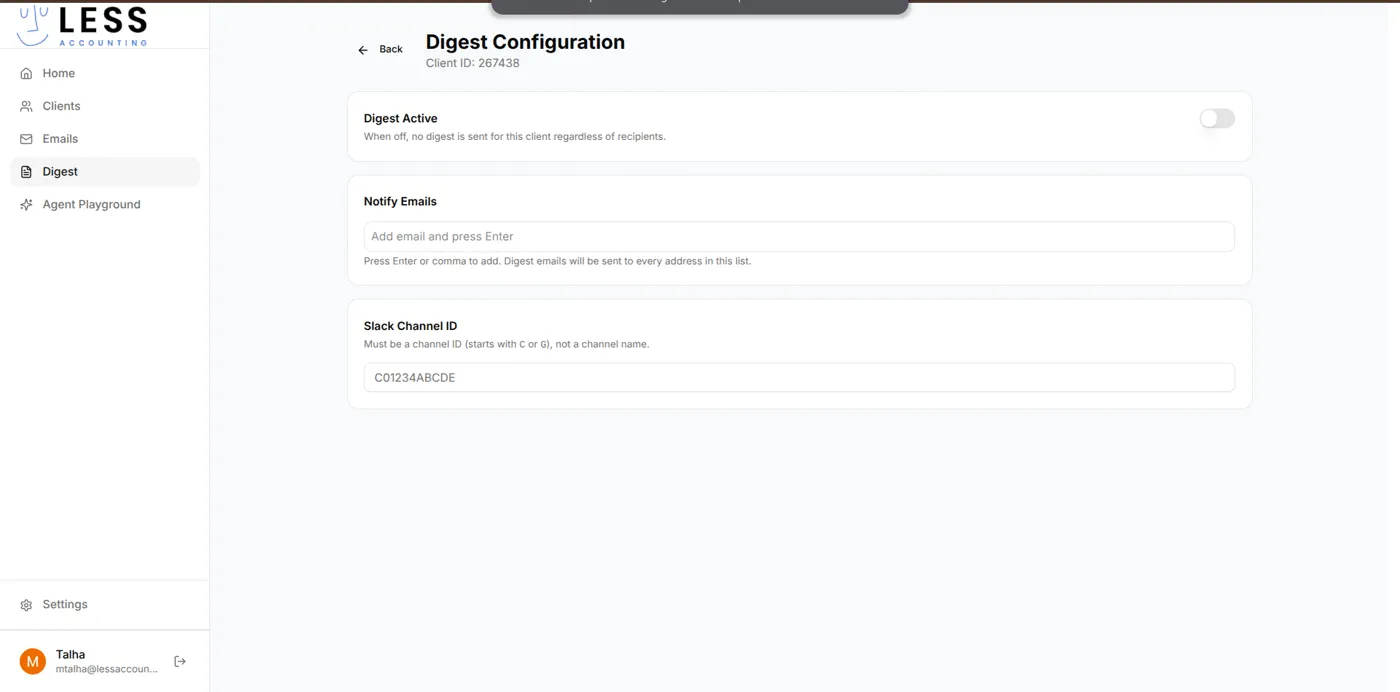
- Per-client digests summarise activity for one client with configurable thresholds, recipients, and an optional Slack channel.
- All-over-clients digests (Daily and Weekly) summarise activity across the whole book.
- A History view lets the operator audit which digests were sent, to whom, and what they contained.
Integrations
- Gmail Domain-Wide Delegation at the Workspace domain level. The Integrations tab shows every domain user, their delegation mode, and last sync state.
- Double HQ for read-only financial sync. Rate-limited, zero-knowledge, encrypted at rest.
- Slack delivery for digests. Channel IDs are configured per client.
Security
JWT auth with refresh, role-based access control via NestJS decorators, per-org visibility scopes for managers, password redaction in logs, Sentry for production error tracking with PII filters, and a deliberately read-only path to financial data.
Performance
BullMQ queues isolate Gmail sync and AI calls from request latency. Pino structured logs are JSON in production with a request-id middleware that ties every log line to the request that produced it. Health-check endpoints cover both API and Redis. Rate limiting (60 req/min default) protects the platform from runaway client tools.
Technical Architecture
The product is a TypeScript monorepo with two apps and two shared packages. Turborepo orchestrates builds and caches between them. Bun runs the dev loop and the tests.
The Prisma schema is split across multiple files (base generator and datasource, user, plus the real domain models added during the build). The shared package carries types and enums that both the Next.js client and the NestJS API import, so JWT payloads, role enums, and DTO contracts cannot drift between frontend and backend.
Key Decisions
- Gmail Domain-Wide Delegation instead of per-user OAuth. OAuth flows break in a daily-use workflow tool when scopes change or tokens expire. DWD is a one-time setup at the Workspace domain plus a maintained allow-list inside the platform. The tradeoff is that the firm must be on Google Workspace.
- NestJS plus Prisma instead of a single-process Next.js API. The Next.js API routes would have worked for the demo. They would not have worked for the queueing, the modular auth and role system, the Swagger contract, and the cron-style jobs the digest pipeline needs. NestJS gives us module boundaries, decorators for auth, and a real provider system. The cost is one more app to operate.
- BullMQ on Redis for every background job. Email sync, AI classification, and digest delivery all share the same queue infrastructure. This means we get retries, deduplication, and observability for free. The cost is Redis as a hard runtime dependency.
- Per-client rule-based scoring augmented with AI helpers, not a black-box model. An operator who cannot explain a score to a client will not trust the platform. The Time, Frustration, and Health scores are derived from inspectable rules with documented thresholds.
- Manager visibility as a first-class scope, separate from role. Roles answer "what can this person do." Visibility answers "which other people can this person see." We modelled them independently so a Manager can be promoted without re-thinking what they see, and a sensitive direct report can be excluded from a manager's view without changing anyone's role.
Results
- Operators triage every client email without manually classifying any of them.
- Replies arrive in the inbox as drafts in the operator's tone, ready to review and send.
- Partners see per-client Time, Frustration, and Health scores and can act on the outliers without scanning every thread.
- A confidential client onboards the firm without giving up read-write access to financial data.
- New team members are enrolled in Gmail sync automatically the moment they join the Workspace domain.
- The platform is in production with a real team using it day to day.
Project Highlights
- Email auto-classification across nine prioritised labels.
- Automatic draft responses written in the operator's tone, picked up from their own past sends.
- Per-client AI special instructions that ride along with every model call.
- Time, Frustration, and Health scores per client, explained in plain language.
- Per-client and all-over-clients digests delivered to email and Slack on a daily or weekly schedule.
- Gmail Domain-Wide Delegation across the Workspace domain with no per-user OAuth re-prompts.
- Read-only encrypted sync with Double HQ for financial data.
- Manager visibility controls separated from role.
- BullMQ-driven background processing for sync, AI, and digest delivery.
Screens and User Flows
The flow an operator runs every day:
The digest pipeline:
Future Growth Opportunities
- Auto-suggest the per-client special instructions from historical patterns so onboarding a new client takes less manual editing.
- A read-only client portal that lets the end client see what their accountant sees, with a redacted view of the score signals.
- Cross-client insights at the firm level: which client segments have the worst Time scores, which messages drive Frustration, where the firm is over-serving and under-billing.
- Wider financial connectors beyond Double HQ as the firm's client base diversifies.
- Native iOS and Android views for triage on the move; the web app is already responsive but a native shell would handle push notifications cleanly.
- An audit log surface exposed to firm Admins so they can see who changed which client setting and when.
Want one of these for your team?
45-min call, fixed quote in 72 hours, code in production by week 4.
Core MVP shipped to production by week 4.
or send a 2-min Loom →or email hello@obsidiancode.io